Shared business records
Shared company records reduce repeated data entry when sales, finance and operations hand work to one another.

 A Rhealo Technologies product
When sales, purchasing and project teams work from different records, even a simple question can take several calls to answer. Alfayn ERP is designed to bring those everyday workflows into a shared business system, so your team can follow the work, understand the numbers and know what needs attention.

Explore how the product could bring its tools and working records into one view. Review the workflow design during your product walkthrough.
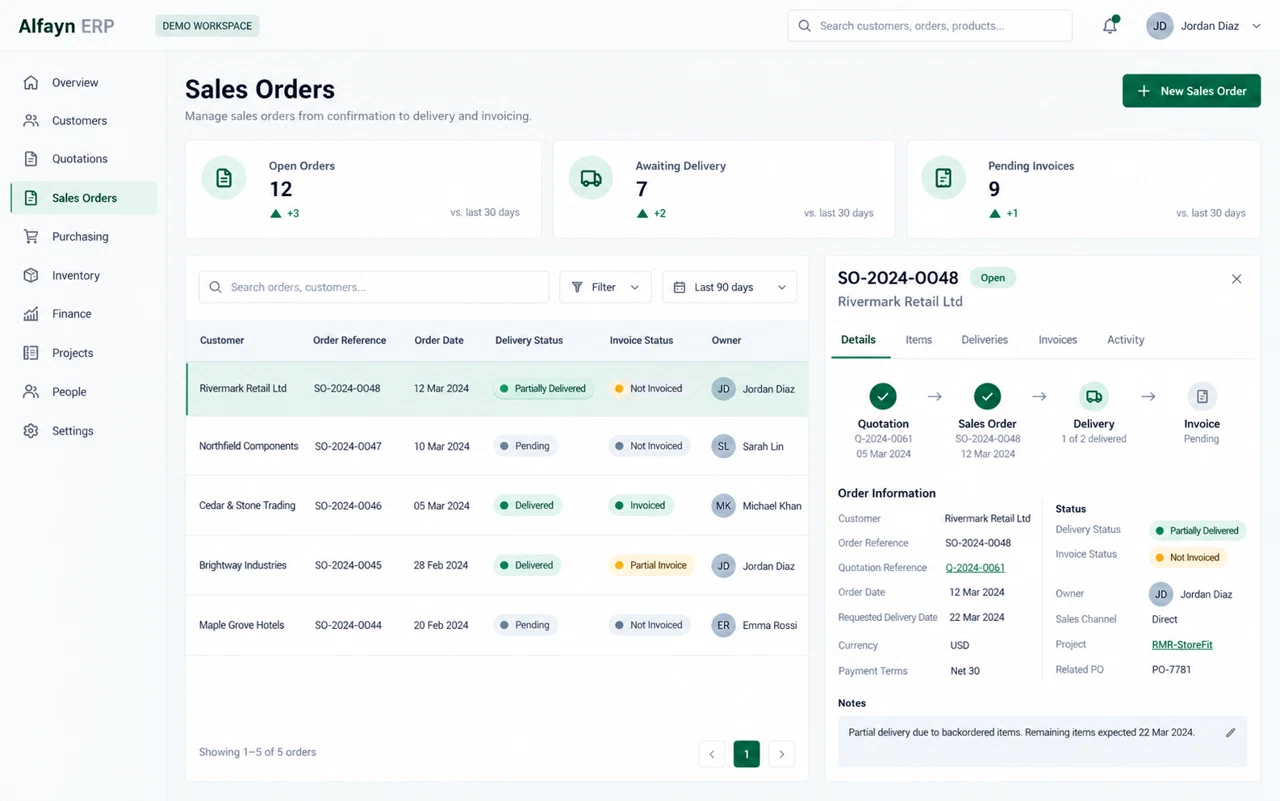
Connect each capability to a day-to-day task and a practical result your team can evaluate.
Shared company records reduce repeated data entry when sales, finance and operations hand work to one another.
Role-based access gives each team the information it needs while keeping sensitive company records restricted.
Follow a customer enquiry through quotation and delivery so commitments remain visible after the sale.
Bring one example from your daily work. We can review the records involved, who owns each step and which integrations are needed before defining the implementation scope.
Discuss your workflowAlfayn ERP is Rhealo Technologies’ enterprise resource planning product for organisations that want a clearer connection between their customers, people, transactions and operations. Instead of starting with a long list of screens, we start with how your business works: who creates a request, who approves it, what happens next and which information each person needs.
A sale does not stop at the quotation. It can affect purchasing, available stock, delivery, billing and a project’s costs. Planning these records together makes the handover easier to follow and reduces the need to explain the same transaction differently in each department. Alfayn ERP provides the product foundation; the implementation scope defines the workflows, modules and integrations your business will use.
Use these business areas to shape your implementation. The proposal and demonstration confirm what is included in your selected release and configuration.
Define the organisation, users and responsibilities first. Discuss which records a person can view, change or approve, and how access changes when their role changes.
Bring the customer conversation into the sales workflow. Map enquiries, follow-ups, quotations and handovers so the next person knows the history and the action still required.
Connect an agreed project with its tasks, responsibilities and progress. Plan the information your office and delivery teams need to share instead of relying on separate updates.
Discuss invoices, expenses, supplier requests and approvals as one transaction flow. Agree the accounting rules and reports with your finance owner before configuration.
Review receiving, availability, reservations and issue or delivery records. Include returns and damaged goods in the workflow so the figures reflect the way stock is actually handled.
Define staff administration and the reports management needs to act on. Agree the meaning, owner and update timing of each figure rather than filling a dashboard with numbers.
Picture a customer accepting a quotation. Sales records the agreement; the operations team checks what is needed; an authorised person reviews any purchase; and finance follows the agreed billing milestones. The useful result is a shared reference for the work, with an understandable status and a clear owner at each step.
Capture the customer, scope, quantities and agreed terms.
Identify stock, purchasing needs and delivery or project responsibilities.
Keep the decision and any requested correction with the original record.
Follow completion and the agreed billing or reporting records.
For organisations operating in Saudi Arabia, the discussion includes Arabic and English terminology, SAR and other required currencies, local document formats, branches, permissions and the reports your team uses. Where tax or electronic invoicing is part of the scope, the requirements and supported integration must be reviewed with your finance team.
Choose representative tasks and identify the spreadsheets, systems and approvals involved.
Confirm modules, data migration, integrations, user roles and acceptance criteria in the proposal.
Use safe sample records to review ordinary tasks, exceptions, Arabic content and permissions.
Agree training, access, operating responsibilities and the support arrangement before wider use.
The selected release and written proposal define the included modules, configuration and integrations. Use the demonstration to confirm the workflows your team needs.
Yes. Share the types of records and systems involved, without sending sensitive data through the enquiry form. Migration and reconciliation are scoped after reviewing their structure and quality.
Your business type, the number and roles of intended users, the languages you need, and one workflow you want to improve. A sample document with confidential details removed can help explain the task.
Request a demonstration or scoping conversation. Pricing is prepared around the agreed modules, users, deployment requirements, migration and support scope.
Tell us which teams need to work together and where the handover becomes difficult. We will use that context to plan a focused product conversation.